Amazon FBA inventory reconciliation: Know what happened to your FBA units.
Worked out from your own reports, then set against Amazon's balance. Upload the reports you already export and Leviathan Recon rebuilds what happened to your stock, per FNSKU. Shipment by shipment, return by return.
14 days free ·Card-free ·Works from your own exports
Leviathan Recon
Where FBA sellers lose units.
Not in one place. Units go missing at different points in the FBA cycle, and each point has its own reconciliation in Recon.
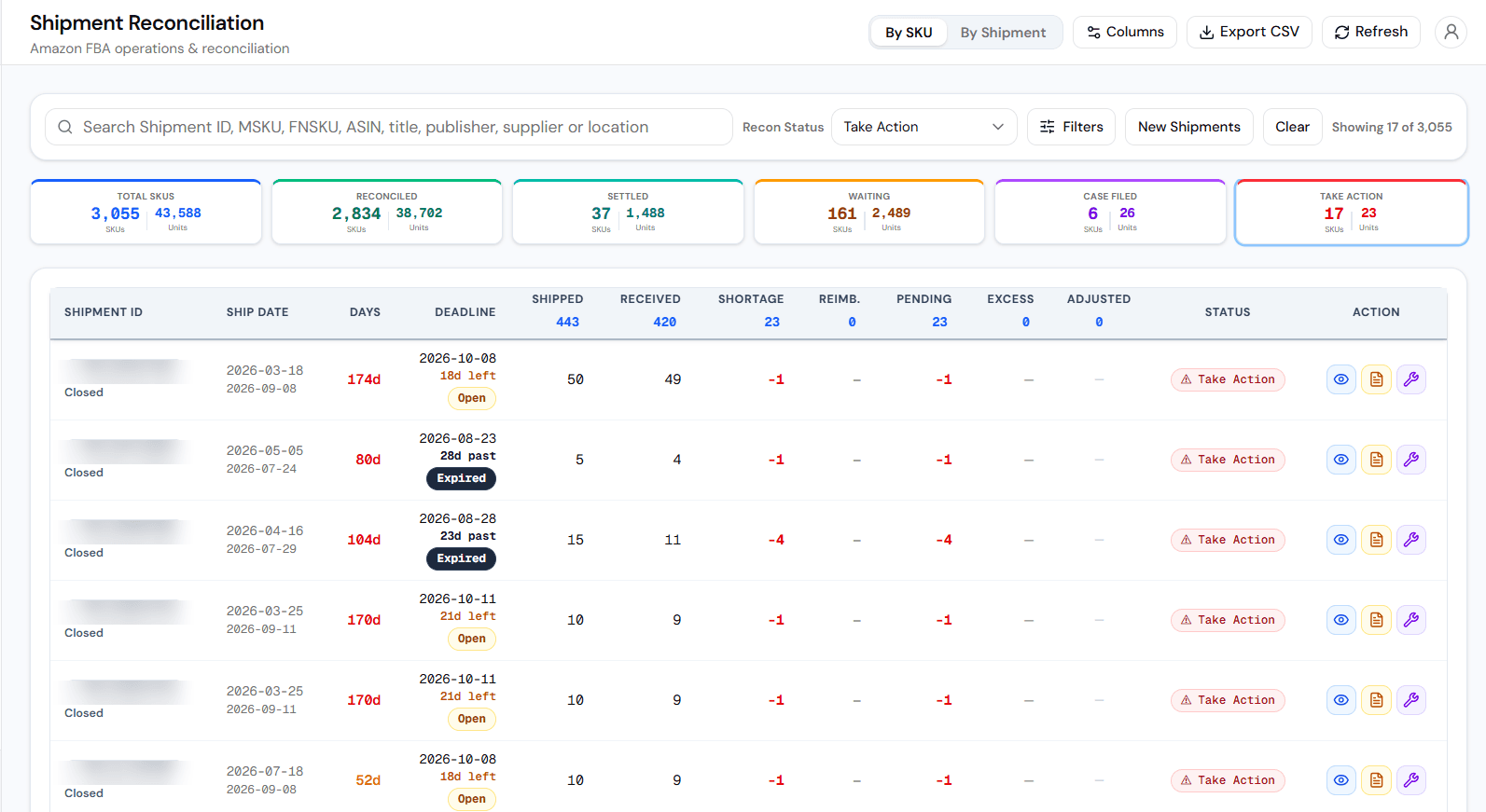
Shipped, never received.
Units you sent to FBA that Amazon checked in short. The shipment closes and the gap stays.
Handled by: Shipment
Refunded, never restocked.
The customer is refunded and the return is due back, but the unit does not reappear in your sellable balance.
Handled by: Returns
Removal orders that arrive short.
You order stock back and fewer units reach you than the order asked for.
Handled by: Removal
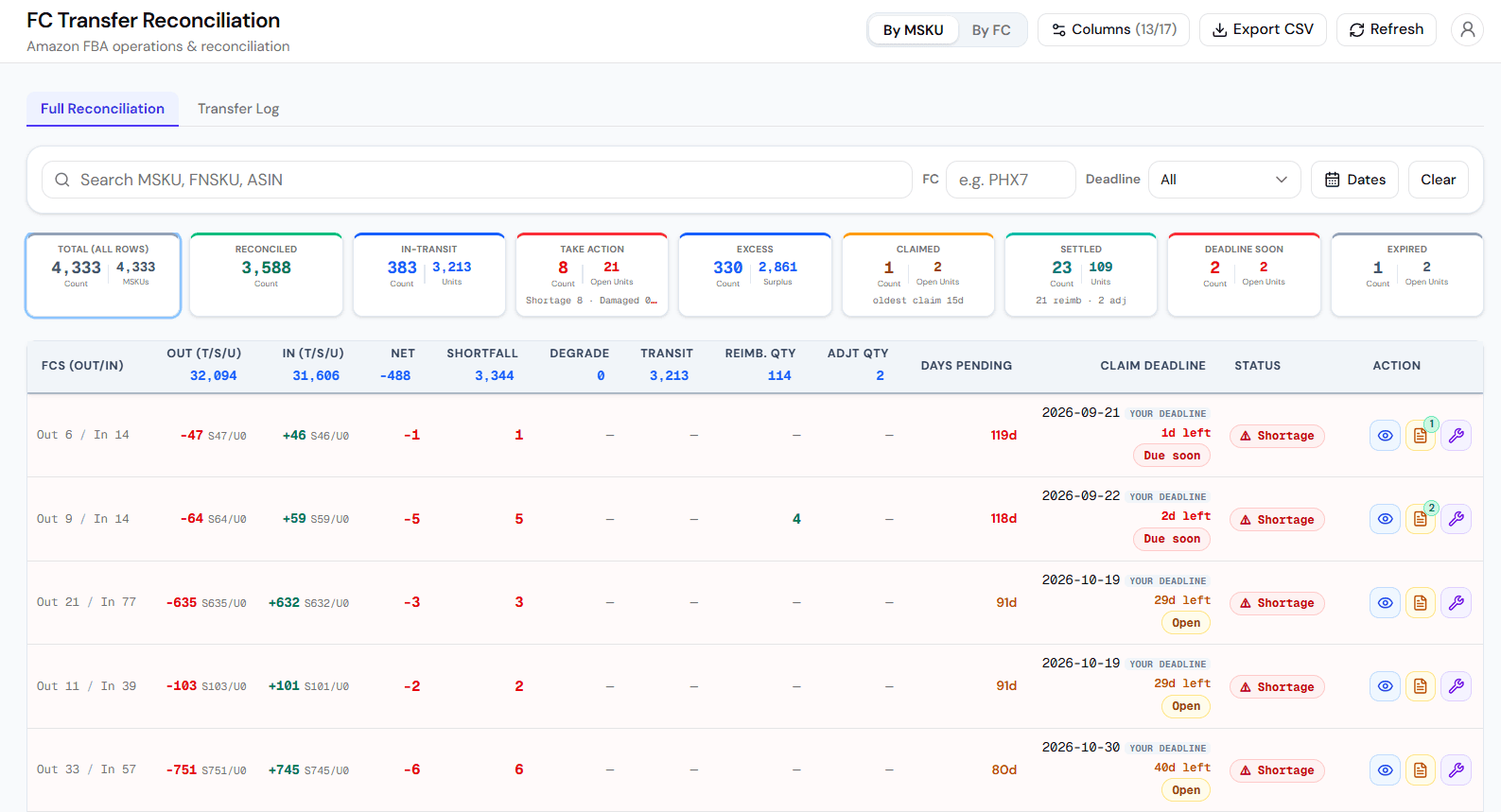
Lost between fulfilment centres.
Units leave one FC in transit to another, and fewer units arrive than left.
Handled by: FC Transfer
Replacements never accounted for.
Amazon ships a replacement unit, the original is due back, and nothing on your side records whether it came.
Handled by: Replacement
Graded stock and adjustments never audited.
Units regraded, disposed of or adjusted in Amazon's own ledger, with nothing on your side to check them against.
Handled by: Grade & ResellAdjustment
The chip on each card is the Recon module that handles it. Each one rebuilds the unit count from the reports you upload, so the gap has a number and a row behind it.
Where Amazon's fees go wrong.
Recon's payment reconciliation checks what Amazon charged you, not only what it holds. FBA fee reconciliation sets the fulfillment fee on each order against Amazon's FBA rate card for that product's size, flags overcharges per ASIN and builds each claim with its evidence.
Each flagged row carries a deadline and a countdown.
Recon puts a claim deadline on each row it flags and counts down the days to it, so you can work the closest ones first. A row near its deadline is marked due soon; a row past it is marked expired, with the days since. These are Recon's dates for working your queue. Whether Amazon accepts a claim is decided by Amazon's own window for that case type.
Leviathan Recon
So I still raise the case myself?
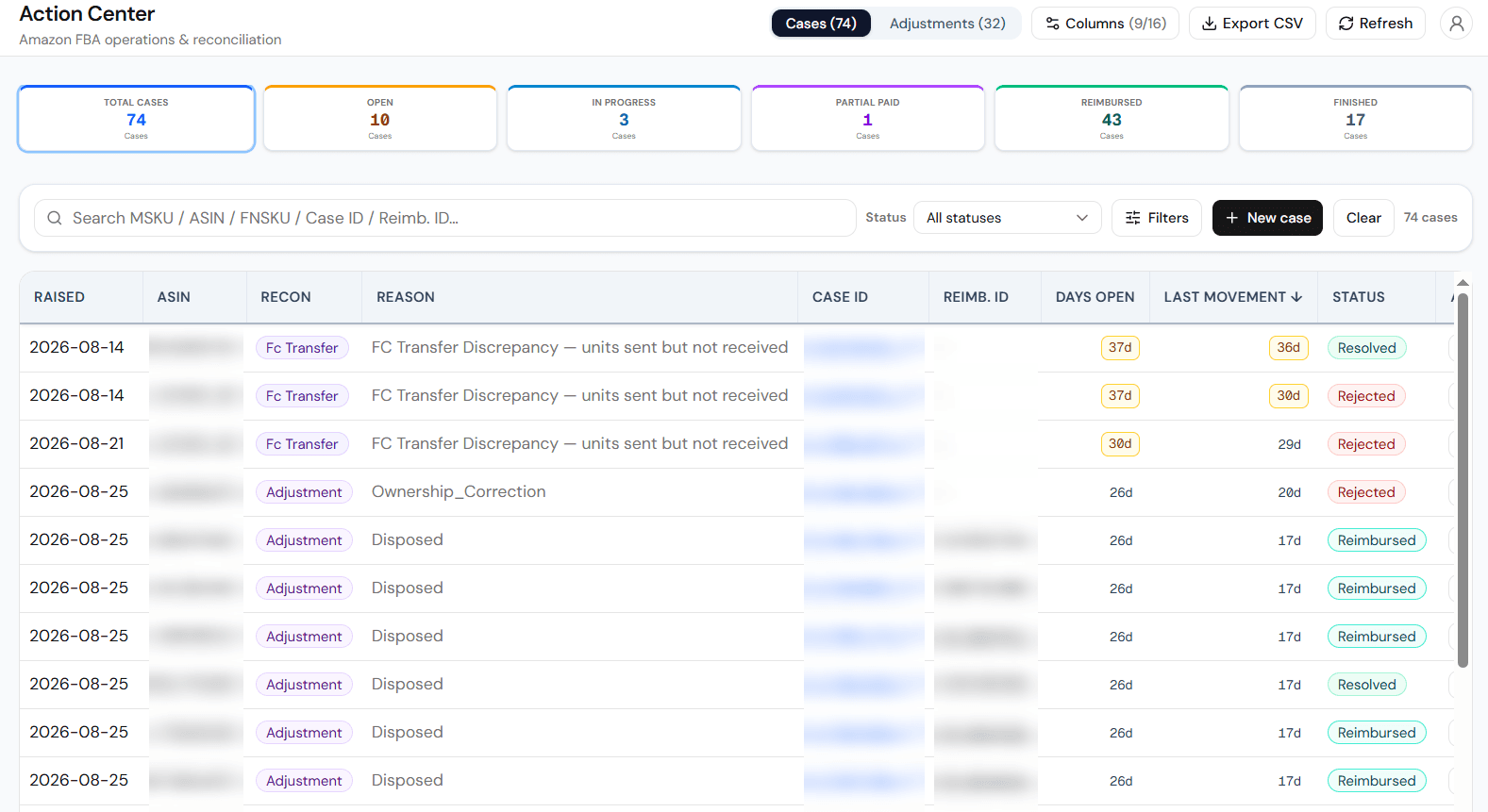
Yes. You raise it in Seller Central, in your own account, and Recon keeps the loop in one place. The Action Center holds each case and adjustment per module: the reason Recon gave for it, the case you raised against it, how long it has been open, and what came back, with a status, remarks and attachments. It keeps the record of what you did there.
Leviathan Recon
Why it is built this way.
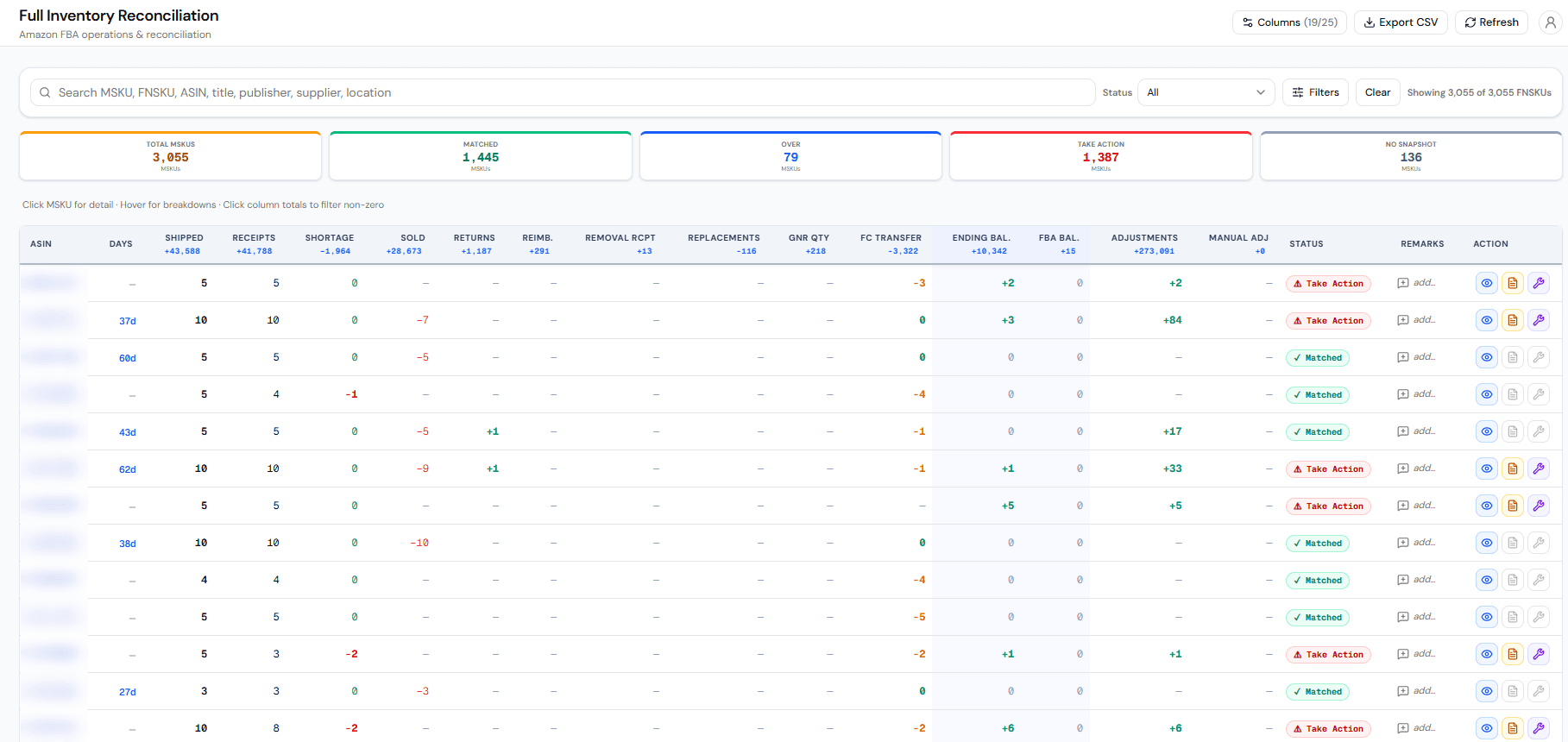
A balance is Amazon's word for what it holds. A ledger is what you can rebuild from your own files and check line by line, which is why Recon starts from the reports you export rather than from an API that hands you a number. The two disagree more often than you would expect, and the disagreement is the product.
It is also why there is nothing to connect. A tool that links to Seller Central through Amazon's API is granted access to the account. Recon works from the files you export: there is no API connection to your account and no credential of yours for Recon to hold.
Harishchandra Bind I answer the support email myself.
In a customer's words.
“Leviathan Recon gives us a clear view of our FBA inventory: current and past stock levels, fast- and slow-moving FNSKUs, and stranded or stuck units. It also shows us where reimbursements are due, so we spend less time digging through reports. The team is responsive and their insights are practical.”
Fellow Books
Online bookseller
Before you start.
No. Leviathan Recon shows you what to file and the units behind it; you raise and track the case in Seller Central yourself. We do not act in your account, we do not submit claims on your behalf, and we do not take a percentage of anything you recover.
Open the Take Action row and you see the units behind the figure. You raise the case in Seller Central yourself, then record it in Recon's Action Center, which keeps cases and adjustments per module with a status, remarks and attachments. That is where you track what you raised and what came back.
Since March 2025, Amazon reimburses FBA inventory lost or damaged before a customer order based on your manufacturing cost. If you don't provide your costs, Amazon applies its estimate, which you can change. Most Amazon reimbursement claim windows are around 60 days, and the exact window depends on the case type. A claim has to be filed inside its window, so the deadline that matters is the one for your case type rather than a single figure. Amazon announced the rule on 18 December 2024.
Four: Shipped to FBA, Inventory Event Detail, Reimbursements and Inbound Shipments. Those are enough to see your inbound shortages. The full set of eighteen unlocks every module.
Once your workspace is ready the upload is yours to do, and nothing waits on us. Four reports are enough for a first pass: Shipped to FBA, Inventory Event Detail, Reimbursements and Inbound Shipments. You export them from Seller Central and upload the files on the upload screen, and Recon rebuilds your ledger from them. Most report types have a CSV template you can download to check the columns before you export.
You sign up with your name, company, work email and a password you choose, then verify your email with the code we send. Your workspace is then set up automatically, usually within a few minutes, and we email you when it is ready. You add a few business details, such as the marketplaces you sell in, and go straight into Recon. The 14 days start when your workspace is ready. We help you get set up and answer questions while you find your way around. There is no credit card at any point.
Nothing is charged, and nothing is deleted. There is no card on file, so there is nothing to charge against. Your workspace becomes read-only: you can still sign in and see what you found, but uploads and changes pause until you subscribe. Before the trial ends, we confirm your plan and its price in writing, based on your FNSKU count, and nothing starts until you agree. You can also use the Subscribe link inside the app at any time.
Leviathan Recon starts with a free 14-day trial and no card on file. When the trial ends nothing is charged and nothing is deleted; your workspace becomes read-only until you subscribe. After the trial, plans are priced by the number of FNSKUs you sell through FBA and start at ₹4,999 a month plus GST, or $49 outside India, billed monthly. To choose a plan, email service@leviathansellers.com. There is no commission and no retainer: we do not file claims for you, so there is nothing to take a percentage of.